What is the Process to Pay Road Tax Online?
Online Road Tax Payment for Vehicle in Delhi
Online road tax payment for commercial vehicle is very easy step to pay online using vahan parivahan portal in Delhi. We give all information about how to pay road tax and check payment tax. Vahan parivahan portal is very useful website for every Indian. Parivahan website offer make payment online no need to go to RTO office.
Procedure of Pay Road Tax for Commercial Vehicle in Delhi
You want to pay your commercial vehicle road tax online please follow below process :
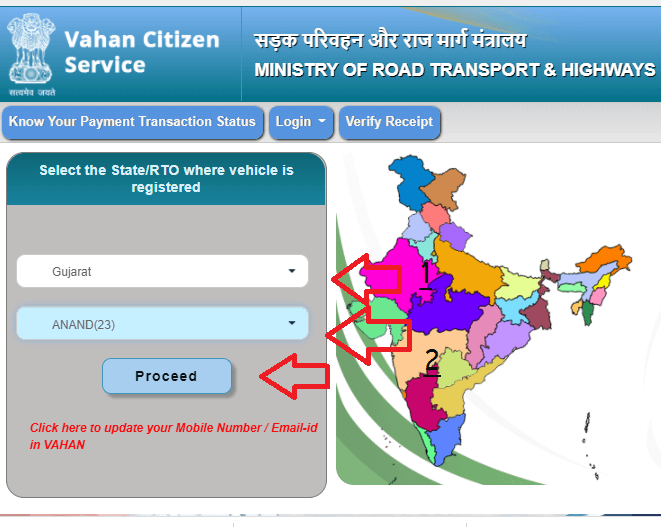
First go to visit vahan parivahan website https://vahan.parivahan.gov.in/vahanservice/, open official website then select state, RTO and click on proceed button.
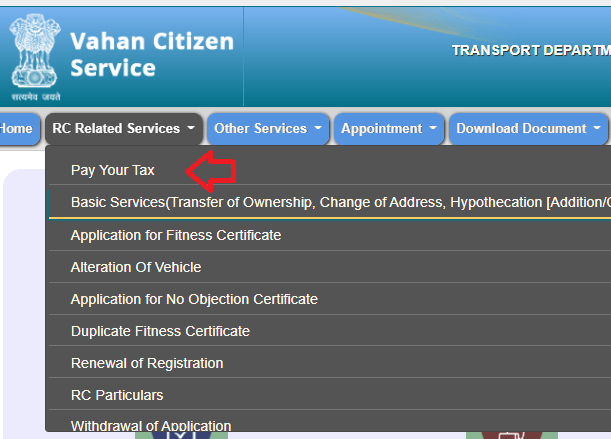
Main menu to select RC related service to pay your tax.
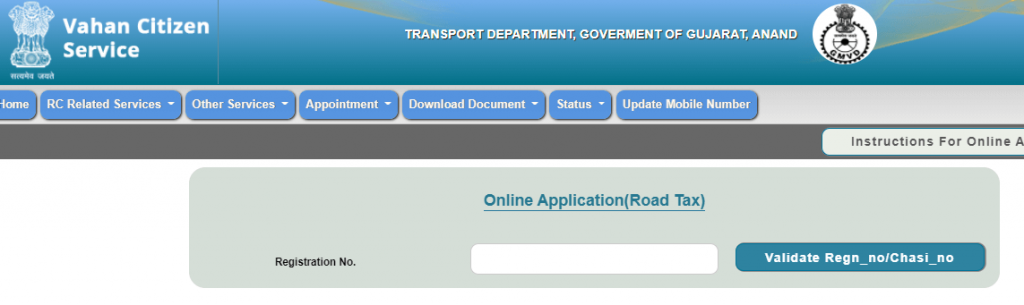
Now enter your register number of vehicle and check how much pending your vehicle tax show.
Pay your pending vehicle tax using online like a net banking or debit card. after successful made payment you can go to renewal of RC.
The procedure of check vehicle tax amount in Delhi
If you do not know how much pay your vehicle road tax then follow the below process to calculate road tax.
First, go to the parivahan vahan portal https://vahan.parivahan.gov.in, and select menu to “Know MV Tax”.
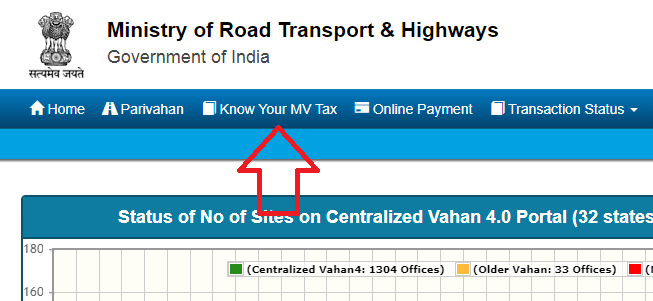
- Now enter your vehicle details :
- Select your state
- Select Vehicle types(Transport or Non-Transport)
- Select Vehicle Class
- Select Vehicle category
- Registration date
- enter all details relater your vehicle
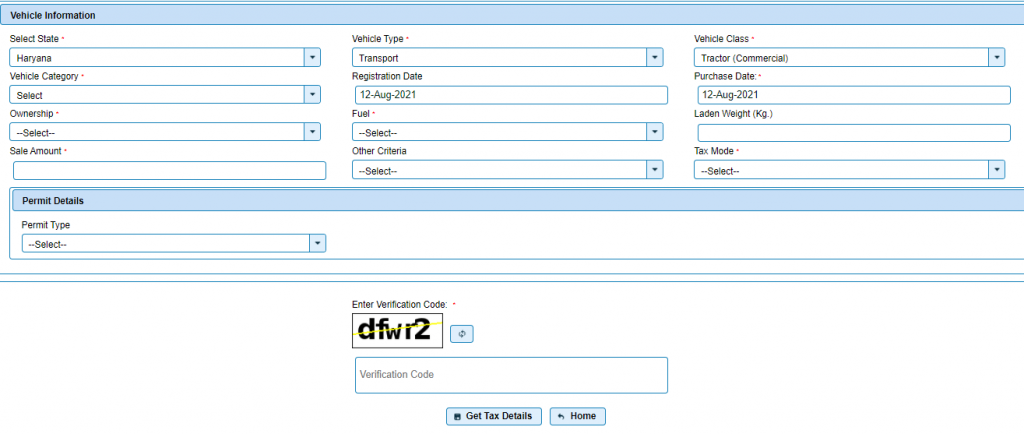
Enter captcha code and click on get tax details button. show on screen your vehicle tax details and pay this amount.
Procedure of Check Road Tax Payment Status in Delhi
If you want to check your payment transaction status then follow below process.
First go to Parivahan Vahan portal https://vahan.parivahan.gov.in, and select from menu to “Transaction Status” >> “Know Your Transaction Status”.
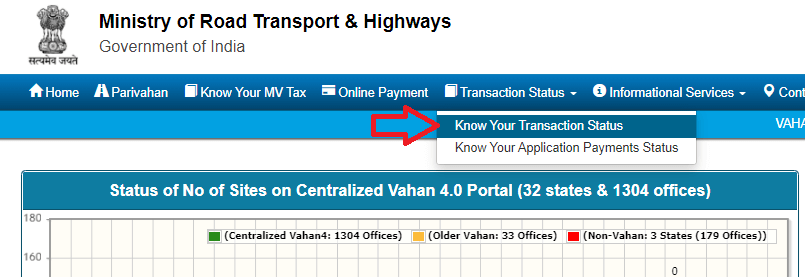
Now select any one option such as Transaction id, Payment id, Bank Ref. No., Registration No., Grn No. and enter details
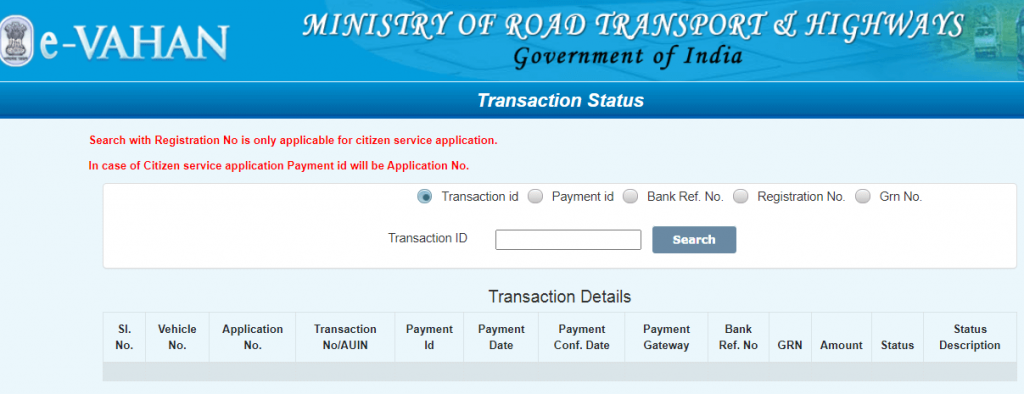
Click on Search Button and get your payment status on your screen
The procedure of re-verify your failed transaction
Note:- If payment has been debited from Account and got failed, then follow below steps to re-verify your failed transaction.
- Please Login through User ID/Password which is provided by RTO https://vahan.parivahan.gov.in/vahan/vahan/ui/eapplication/form_payment.xhtml.
- You will receive all failed transactions against Application After Login.
- Click on Re-verify Button.
- Re-verify transaction which was failed but amount has been debited from the Bank A/C.
- Receipt will be generated if response is Successful After re-verifying ,Otherwise
- Response from Bank Side will be shown
Related Articles
EPFO Payment Online Process & Steps
The employee Provident Fund Scheme is one of the most useful employee beneficial schemes introduced by the Ministry of Labour. It is one of the ideal retirement funds. It is a type of savings account where both employer and employee contributes an ...Online SBI for Retail and Corporate Customers
State Bank of India is India's largest bank with a network of over 15000 branches and 5 associate banks located even in the remotest parts of India. State Bank of India (SBI) offers a wide range of banking products and services to corporate and ...Union Bank of India Online Account Opening
Union Bank of India offers zero balance accounts to its customers. Besides, Basic Savings Bank Deposit Accounts (BSBDA), Union Bank of India has introduced online zero balance account. Individuals don’t have to maintain any average balance in these ...How to Search Job Card Number Online ?
Job Card Number Search Online: The facility of searching NREGA job card numbers is available on the website of the Ministry of Rural Development. If your job card is lost or damaged somewhere, then you can easily get a duplicate MNREGA job card ...Thinking of buying cryptocurrencies? Be ready to pay taxes on your investment gains
What is bitcoin? Bitcoin is one of the earliest forms of cryptocurrency, forming part of the worldwide peer-to-peer payment system. Cryptocurrency is digital money. It is considered to be more secure than real money. Cryptocurrency uses something ...