How to Generate E Way Bill For Unregistered Person
How to Generate E-Way Bill for Unregistered Person?
An E-Way Bill is an online document that is generated via an e-way bill portal for the movement of goods from one place to another. The Government of India implemented an e-way bill to minimize the illegal movement of goods and control tax evasion incidents. Usually, the supplier or transporter is responsible for generating an e-way bill but in certain circumstances, an unregistered buyer can also generate an e-way bill. So, the question is how to generate an e-way bill for an unregistered buyer?
Circumstances for E-Way Bill Generation by Unregistered Person
Here is the list of circumstances where an e-way bill can be generated by an Unregistered Person
- When neither the consignor nor the transporter has generated an e-way bill
- When the supplier is an unregistered dealer under GST.
- When an unregistered buyer is moving goods under ex-works contracts.
- When the conveyance belongs to an unregistered buyer.
How to Generate E-way Bill for Unregistered Person?
Here is a step-by-step guide using which an Unregistered Person can easily generate an e-way bill:
Step 1: Open the e-way bill portal.
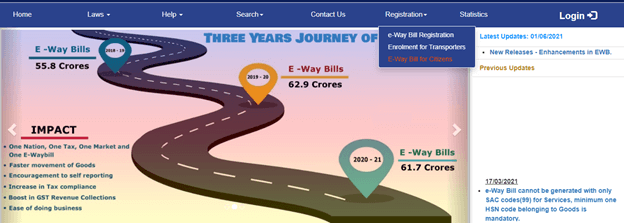
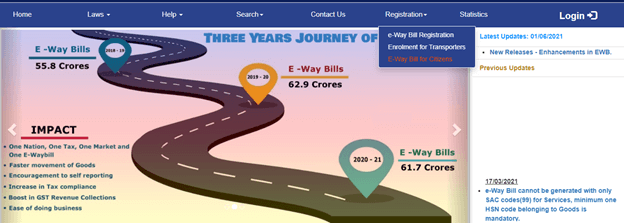
Step 2: From the top-most menu bar click on the Registration tab and select E-way Bill for Citizens option.
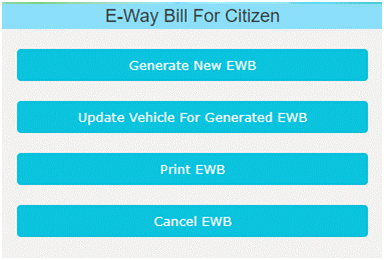
Step 3: Once you click on that e-way bill for citizens, select Generate New EWB option.
Step 4: Furnish all the required details for e-way bill registration such as:
- State
- Name
- Address
- Contact Details
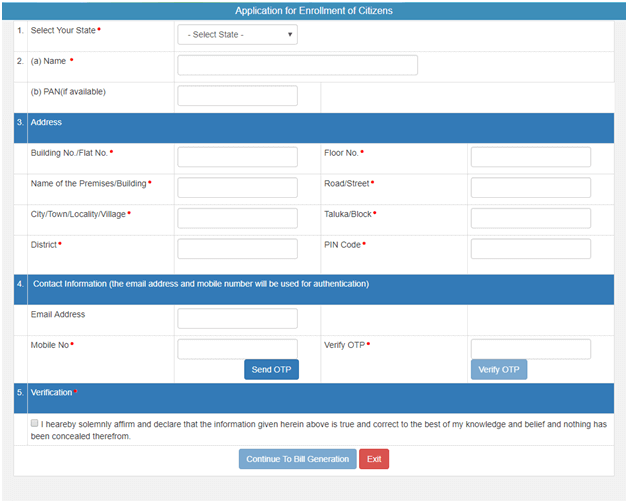
Step 5: Enter the OTP received on the mobile number added in the contact information and verify OTP.
Step 6: Click on the verification box to Continue to Bill Generation.
Step 7: Now enter the mandatory consignment and vehicle details:
1. The Mandatory field in the ‘To’ section
GSTIN: In this field enter the GSTIN or URP in case of an unregistered person.
PIN and State: Pin of the place where goods are being sent to.
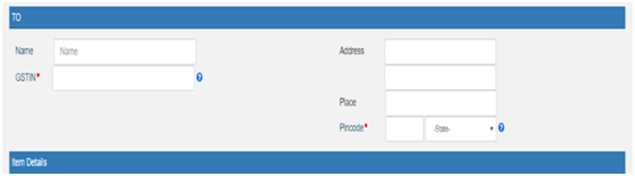
2. The Mandatory field in ‘From’ section:
i. Product name and description
ii. HSN code
iii. Quantity
iv. Taxable value
v. GST break-up

3. The Mandatory fields in Part B of E-way bill form
i. Approximate Distance
ii. Mode of conveyance
iii. Vehicle number
iv. Transporter’s details
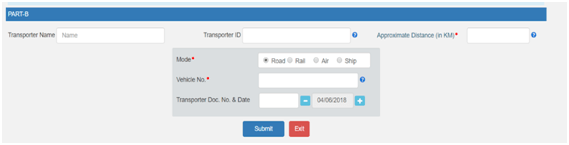
Step 8: Click on the Submit button to generate a 12-digit e-way bill number.
Step 9: The unregistered buyer can also print the generated e-way bill by clicking on the Print EWB option.
Note: As an unregistered buyer always carry a copy of generated e-way bill while transporting the consignment of goods.
Related Articles
Prerequisites for e-Way Bill Generation
Prerequisites for e-Way Bill Generation There are some prerequisites for generating an eway bill (for any method of generation): Registration on the EWB Portal The Invoice/ Bill/ Challan related to the consignment of goods must be in hand. If ...E-Way Bill under Goods & Service Tax - All You Need to Know.
E-Way Bill under GST An E-way bill is a document required to be carried by a person in charge of the conveyance carrying any consignment of goods of value exceeding fifty thousand rupees as mandated by the Government in terms of Section 68 of the ...How to Generate e way Bill for Unregistered Buyer
E-Way Bill in case of Sale by Unregistered Person In case the movement of goods is done by a person who is not registered under GST, either in his own conveyance or through a hired conveyance or through a transporter, the e-way bill in such a case ...How to Generate e way bill for multiple invoices?
How to Generate E-Way Bill for Multiple Invoices Consolidated E-Way Bill (EWB-02) is a single document that contains details of all the E-Way Bills related to the consignments. If you are a transporter/ supplier who wants to transport multiple ...Cases When E-Way Bill is Not Required
Cases when an Eway bill is not required The Goods and Services Tax (GST) law was introduced in India to correct the erstwhile law’s several wrongs. One of the main problems was a lack of transparency concerning both the taxpayers and the government. ...